 26
Text expander for Windows, Mac & Linux, with AI rewrites and voice typing
Lightning Assist vs TidyList ›
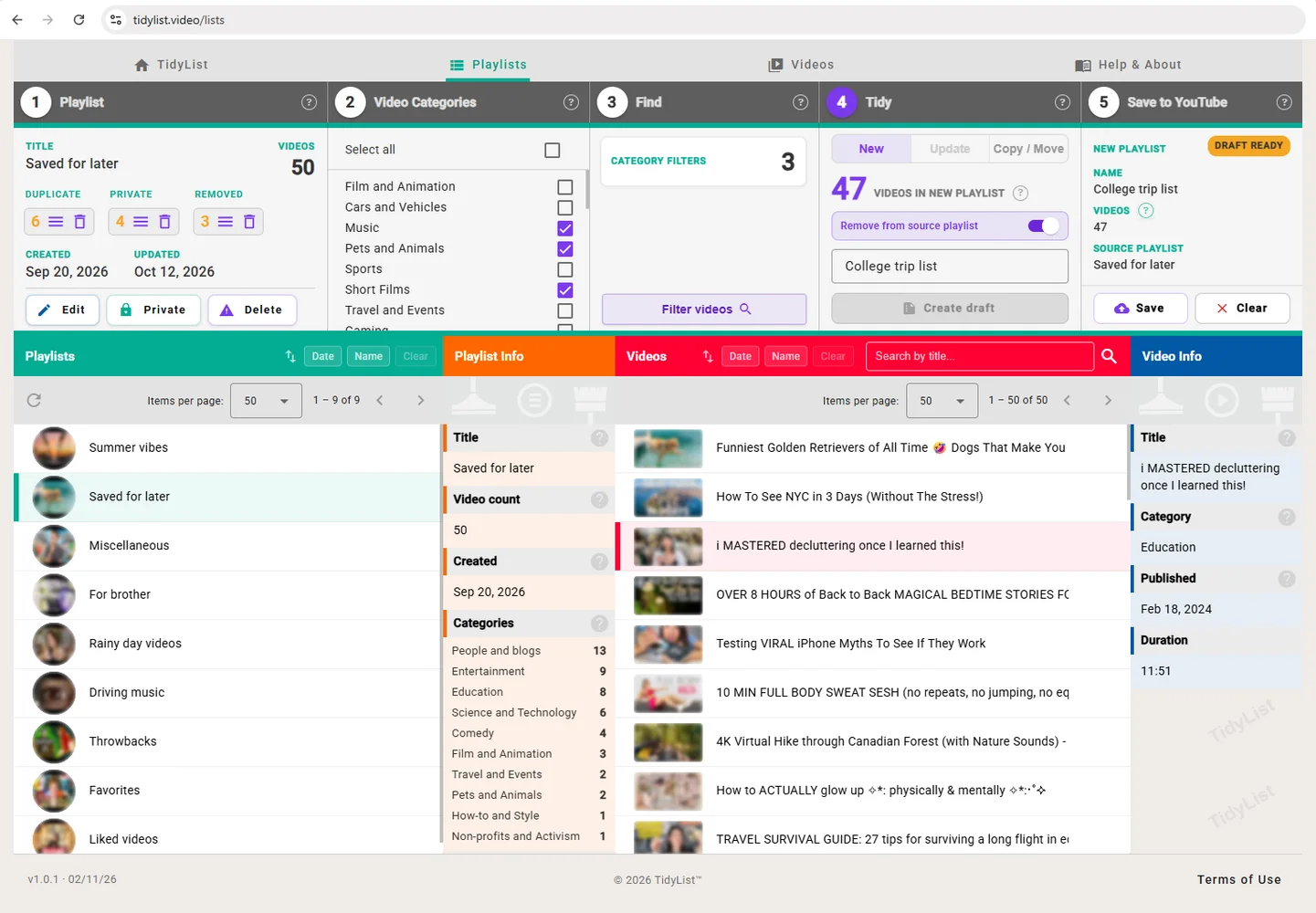
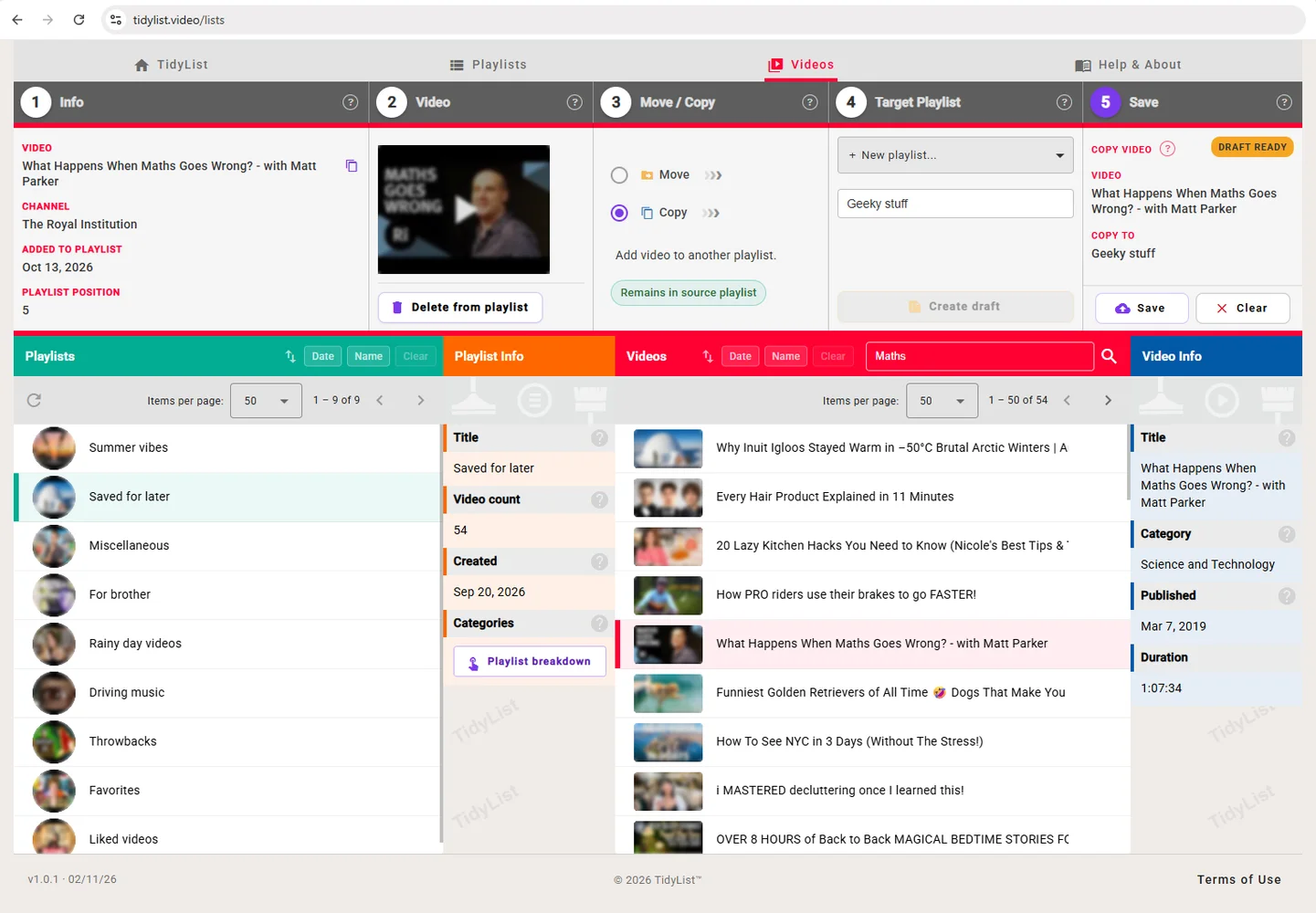
TidyList is a web app for managing YouTube playlists. It counts duplicate, private and removed videos in any playlist and clears them in one step. It also pulls out just the videos you want, by category or title, and saves them as a new playlist, or copies or moves them in bulk. Nothing changes on YouTube until you've seen exactly what will happen and confirmed it, and there's nothing to install, just a Google sign-in.
Free to browse and check your playlists. Pro is a one-off £4.99, with no auto-renewal.
TidyList is a productivity tool, available on Web. TidyList is freemium: there is a free plan and paid plans start at £4.99 one-time. Key features include duplicate, private and removed video counts on every playlist, clear them in one step, filter a playlist by category or title and save results as a new playlist. It is built by Sam Wootton in the United Kingdom and has been around since 2026. It launched on DodoLaunch in week 47 of 2026, finishing No. 2 that week.
| Product | Pricing | Platforms | Rating |
|---|---|---|---|
| TidyList | From £4.99 one-time | Web | – |
| Lightning Assist | From $5.99/mo | macOS, Windows, Linux | – |
| 1Sentence Deck | Free | Web | – |
| Chitroll for Mac | Paid | macOS | – |
| Pawfora | From $109/mo | Web | – |
Honest reviews from real users help others decide.
No. Every change is a draft first, showing exactly what will happen, and nothing changes on YouTube until you confirm it.
Browse your playlists, see the duplicate, private and removed counts, and filter by category or title. Saving changes needs Pro, which is £4.99 for a month or £11.99 for a year, with no auto-renewal.
For your privacy and security, your playlists and videos are never stored. TidyList reads them from YouTube while you use it, and there's no analytics or tracking of any kind. If you buy Pro, only what the licence needs is kept: your Google account ID, the email you enter at checkout and your access dates.
TidyList is freemium: there is a free plan and paid plans start at £4.99 one-time. Prices are as listed by the maker; check the website for current pricing.
TidyList is available on Web.
TidyList is a productivity tool. TidyList is a web app for managing YouTube playlists. It is listed in Productivity on DodoLaunch.
Popular alternatives to TidyList in Productivity include Lightning Assist, 1Sentence Deck, Chitroll for Mac and Pawfora. They are ranked by reviews, votes and fit on the TidyList alternatives page.
TidyList launched on DodoLaunch in week 47 of 2026 and finished No. 2 on the weekly board.
TidyList is built by Sam Wootton, based in the United Kingdom. The product was founded in 2026.
26Text expander for Windows, Mac & Linux, with AI rewrites and voice typing
Lightning Assist vs TidyList › 11
A pitch deck method for founders without warm intros, built on one thesis.
 10
A paper-style to-do list you can cut and tear off on your Mac
Chitroll for Mac vs TidyList ›Manage bookings, scheduling, and grooming reports for your pet shop in one platf
Pawfora vs TidyList › 8
7 free cold email templates to get investor meetings, from pre-seed to Series A
 8
Track time per task with and view weekly, monthly, yearly reports
Opens your assistant with a question about us. Read what it says.
Structured, machine-readable access to every launch.
 ChatGPT
 Claude
 Perplexity
 Grok
Discussion.
4 commentsThe draft-first step, seeing exactly what changes before confirming, is the right default for bulk edits on something you can't easily undo. Does the preview also list which videos are private or removed, or only the counts?
Thanks, that's exactly why it works that way. The counts show the moment you open a playlist, for free. With Pro you can also view the private and removed videos as a list before deleting anything. YouTube hides their titles, so each row shows when it was added and where it sits in the playlist, plus the video ID if you want to look up what it was.
To answer your question more directly: yes, it lists them. Open the Private or Removed view and you see exactly which entries the delete would remove, row by row, before anything happens.
To be clear on that last point: you see each entry listed, but YouTube hides what the video was, so the rows show when it was added, its position and its ID, not its title.