Ostgate
SSH, Remote Desktop and tunnels to private GCP VMs from a Mac, no gcloud
Overview.
Ostgate is a native Mac app for people who connect to Google Compute Engine VMs that have no public IP. Google's IAP Desktop runs only on Windows, and on a Mac the documented route is gcloud, with one terminal window per tunnel and each local port picked by hand.
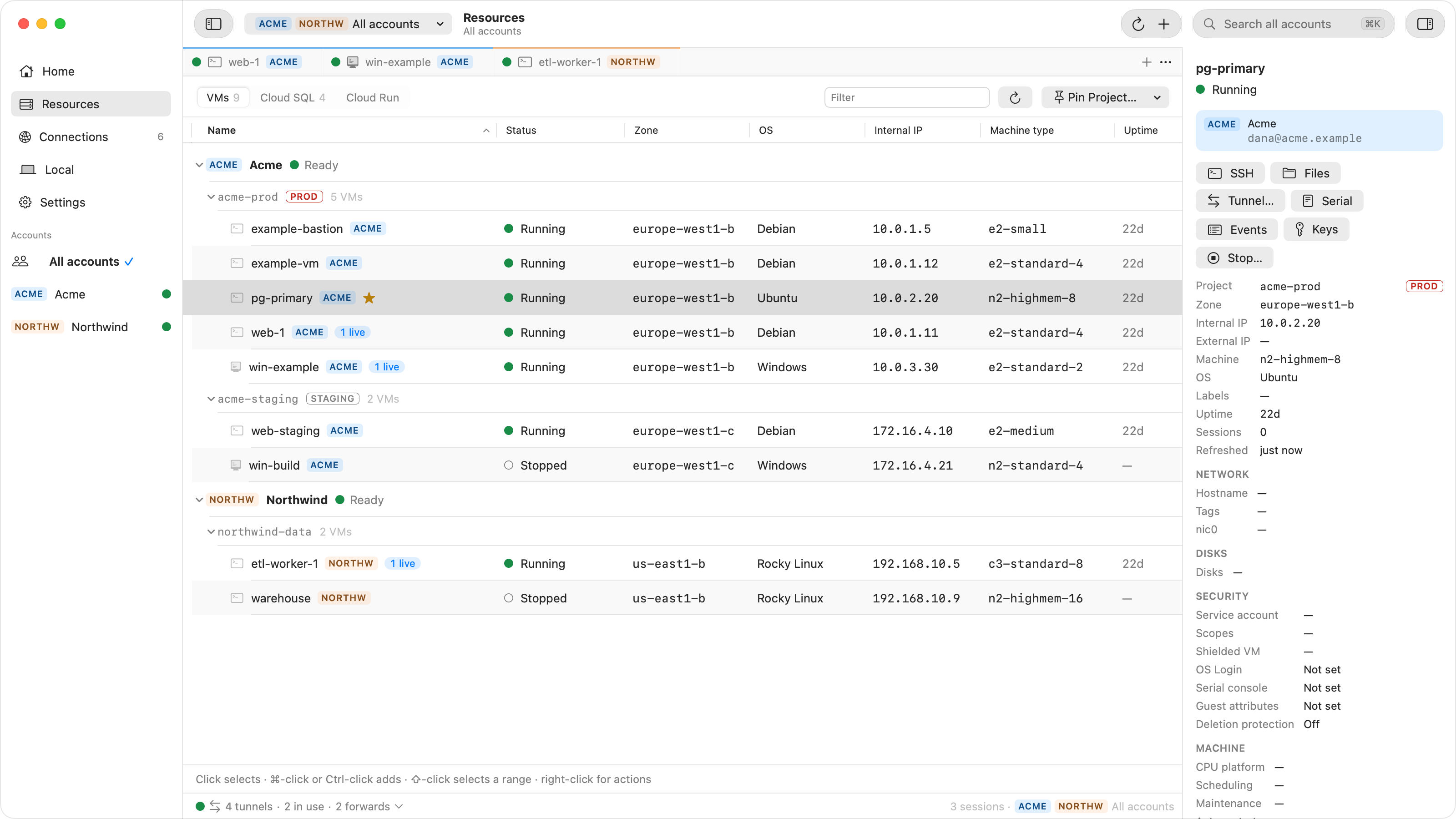
Ostgate opens SSH terminal tabs, an SFTP browser, Remote Desktop to Windows VMs inside its window, and IAP TCP tunnels from any VM port to 127.0.0.1. Forwards through a VM reach internal load balancers and Cloud SQL private IPs. Several Google accounts stay signed in side by side.
Connections go from your Mac straight to Google's Identity-Aware Proxy, with no Ostgate server in the path and no telemetry. Tokens are kept in the macOS Keychain, and SSH keys are generated in the Secure Enclave where the hardware allows. You do not need gcloud installed.
Needs an Apple Silicon Mac with macOS 15 or later. 7-day free trial with no sign-up. Not affiliated with Google.
Ostgate at a glance.
Ostgate is a developer tool for developers and enterprises, available on macOS. Ostgate is paid with a free trial; plans start at $9/mo. Key features include SSH terminal tabs to VMs with no external IP, remote Desktop to Windows VMs inside the app, SFTP file browser and IAP TCP tunnels from any VM port to 127.0.0.1. It integrates with Google Cloud IAP, Compute Engine, Cloud SQL and Cloud Run. It is built by Edgar S. It launched on DodoLaunch in week 45 of 2026, finishing No. 18 that week.
- Category
- Developer Tools +2
- Pricing
- Free trial
- Starting price
- $9/mo
- Free plan
- No
- Free trial
- Yes
- Platforms
- macOS
- Best for
- Developers, Enterprises
- Integrations
- 4
- Launched in
- Week 45, 2026
- Weekly rank
- No. 18
- Maker
- Edgar S
- Rating
- No reviews yet
Screenshots.
Features.
- SSH terminal tabs to VMs with no external IP
- Remote Desktop to Windows VMs inside the app
- SFTP file browser
- IAP TCP tunnels from any VM port to 127.0.0.1
- Forwards to internal load balancers and Cloud SQL private IPs
- Several Google accounts signed in side by side
- ssh ProxyCommand setup for Terminal and IDEs
- Names the missing IAM role or firewall rule when a connection fails
Pricing.
- Or $9 per month
- For individuals who pay for their own licence
- SSH, Remote Desktop, files, tunnels and forwards
- Two Macs at a time
- Every update while the licence is active
- Support by email
- Per user; or $14 per user per month
- For companies that pay for the people who use it
- SSH, Remote Desktop, files, tunnels and forwards
- One licence per person, two Macs each
- 10% off from 10 users
- Invoice with your company's name and VAT number
- Support by email
Prices as listed by the maker. Check the website for current pricing.
Ratings and reviews.
Honest reviews from real users help others decide.
Ostgate FAQ.
Do I need gcloud installed?
No. Ostgate signs in with your Google account in your own browser and opens IAP tunnels itself. It never reads or runs gcloud, so the Google Cloud SDK does not need to be on your Mac.
Does my traffic go through Ostgate's servers?
No. Sessions and API calls go from your Mac to Google, and the app collects no telemetry. The one request that reaches Ostgate is the licence check, which carries a hardware hash and a device key, not your account, projects, machines or traffic.
What does my project need?
The same setup as IAP Desktop: a firewall rule that allows ingress from 35.235.240.0/20 to the ports you use, and the IAP-secured Tunnel User role (roles/iap.tunnelResourceAccessor) for each person who connects, plus read access to list projects and instances. Nothing is installed on the VMs.
Which Macs does it run on?
Apple Silicon Macs with macOS 15 or later. Intel Macs are not supported. Every Mac starts with a 7-day free trial with no sign-up, then needs a licence key.
How much does Ostgate cost?
Ostgate is paid with a free trial; plans start at $9/mo. Listed plans: Personal at $79/year, Business at $129/year. Prices are as listed by the maker; check the website for current pricing.
Is Ostgate free?
Ostgate is a paid product with a free trial, so you can test it before you pay.
Who is Ostgate for?
Ostgate is a developer tool built for developers and enterprises. It is listed in Developer Tools on DodoLaunch.
When did Ostgate launch on DodoLaunch?
Ostgate launched on DodoLaunch in week 45 of 2026 and finished No. 18 on the weekly board.
Who makes Ostgate?
Ostgate is built by Edgar S.
Launch history.
- Week 45, 2026Community ranking0Live
 ChatGPT
 Claude
 Perplexity
 Grok
Discussion.
Ask the makers the question you'd ask on a sales call.